
In-app bug & feedback intake for Neurow.
The problem
Users had no way to tell us when something broke or when they had an idea. Reports arrived through Slack DMs and emails, or not at all, and by the time the team saw them the details needed to reproduce the problem were gone. With a reactivation wave coming, we were about to put a cohort back into the product with no structured way to hear from them.
What I proposed
A Send feedback button in the Neurow app, so any signed-in user can report a bug or share an idea in a few seconds without leaving what they were doing. Each submission creates a ticket in the team's issue tracker (Linear) automatically, so nothing has to be copied over by hand.
Goals
- A user can report a bug or send feedback from the homepage in under 30 seconds
- Every submission lands in the team's queue, correctly labelled, with no manual re-entry
- Every bug report arrives with enough context that an engineer can start without asking the user anything
Prototypes
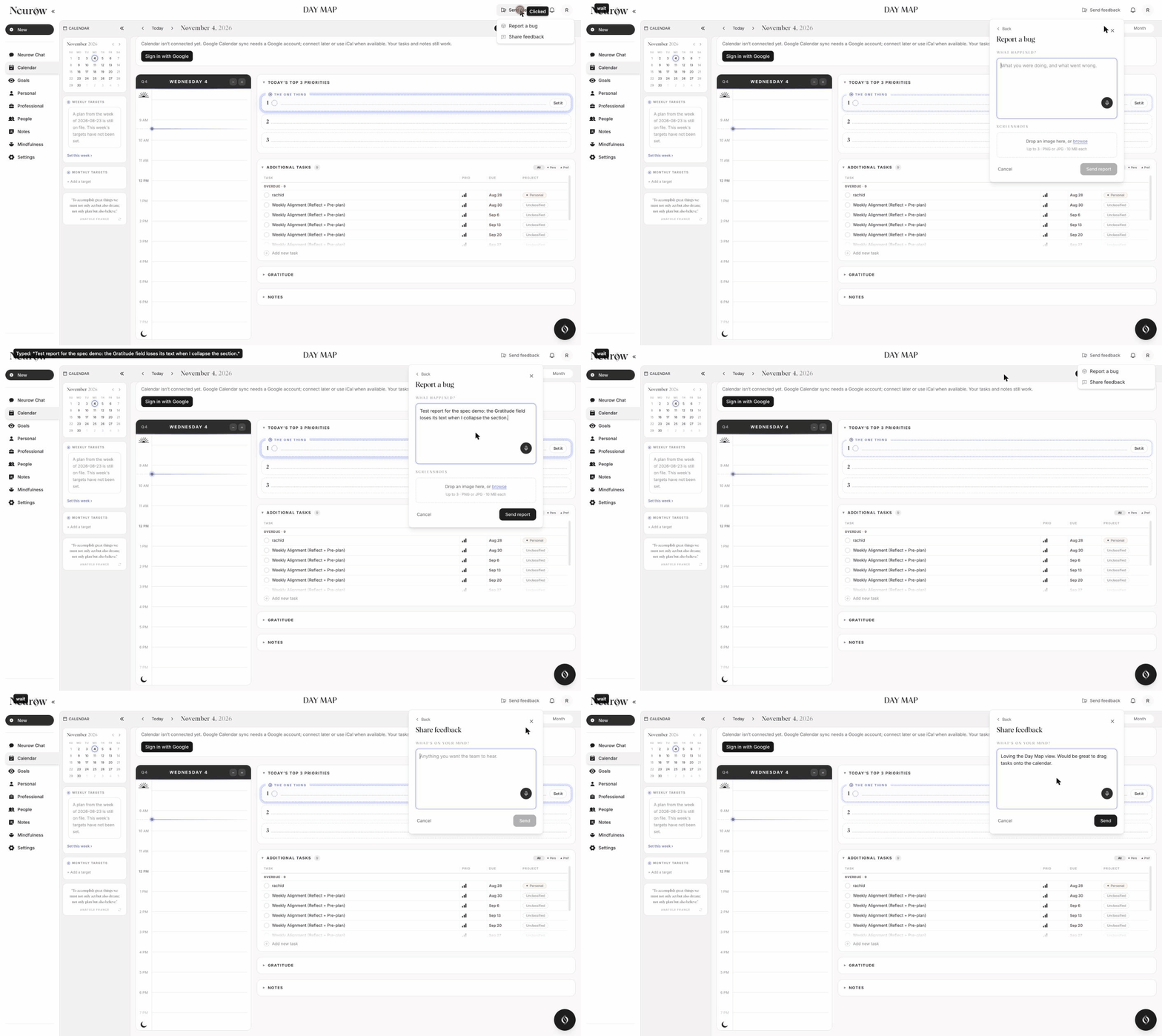
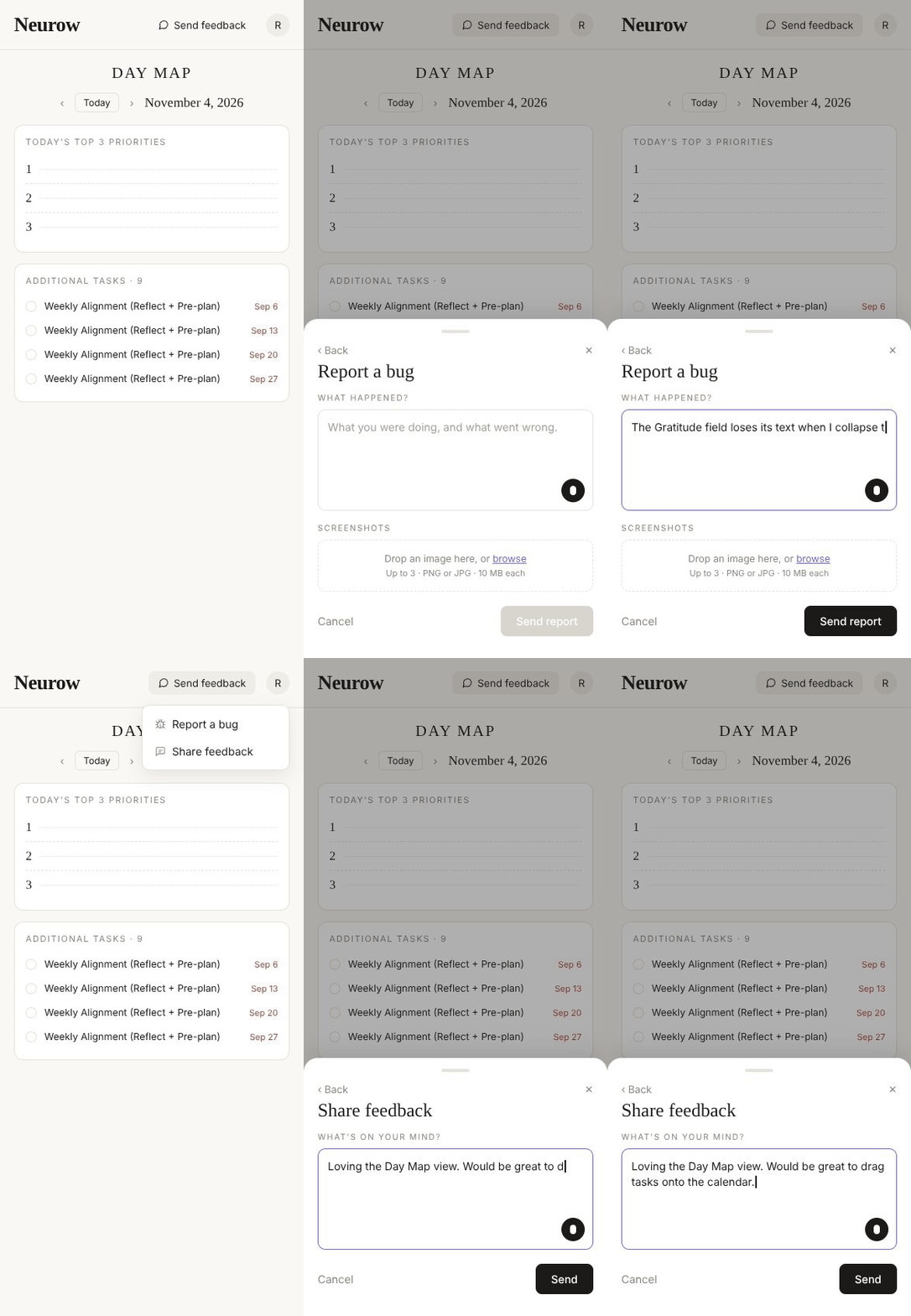
Two design variants went to review: a dropdown from the top bar, and a popup.
Web
Mobile
What the user experiences
- They click Send feedback in the top bar and choose Report a bug or Share feedback.
- Report a bug asks What happened? and, optionally, What did you expect? They can attach up to 3 screenshots.
- Share feedback asks one question: What's on your mind?
- They press send and see a short confirmation. We don't promise a reply.
If sending fails, their text stays in the box and they can try again. Nothing they wrote is lost.
What happens on our side
- Every submission becomes a ticket in Linear, in the team's Triage queue, labelled either Bug or Feedback.
- A bug ticket includes the user's description, the page they were on, their screenshots, and a link to a replay of what their screen did just before the report (via PostHog).
- A feedback ticket includes the text and the page. No replay.
- Tickets identify the user by an anonymous account code, never by name or email.
Not in this version
- Replying to the user or telling them when something is fixed
- Ratings or satisfaction scores
- Sorting or assigning tickets automatically; a person triages them
- Remembering a half-written report if the user closes the form
Privacy
Shipping this feature, together with product analytics, meant updating the privacy policy on the landing page and inside the app before launch. The existing, legally reviewed policy stays as is; we add clauses saying that:
- We use PostHog (usage analytics and screen replays) and Sentry (error monitoring).
- This data is used only to run and improve the product, never for ads, resale, or AI training.
- Coaching content is masked out of screen replays.
- Bug reports and feedback (the text, the page, basic technical context) go to our internal issue tracker under an anonymous account code.
How we know it's ready
- The button is visible to every signed-in user on desktop and mobile, and works with a keyboard
- Both forms are one click away; the user can go back or close at any time
- A report can't be sent empty; screenshots are limited to 3 and to a sensible file size
- Bugs arrive in Linear labelled Bug, feedback labelled Feedback, with all the details above
- Bug tickets carry a working replay link, or say clearly that there is none
- The user always sees a confirmation, and never loses their text on a failure
- Test submissions from staging never reach the real queue
Neurow, the short version.
- Problem — bugs and ideas reached the team through Slack DMs and emails, or not at all, with the details needed to reproduce them already gone.
- Solution — a Send feedback button in the app: report a bug or share an idea in under 30 seconds, without leaving the page.
- Behind it — every submission becomes a labelled Linear ticket; bug tickets carry the page, screenshots and a PostHog screen replay; users stay anonymous.
- Scope — no replies, ratings or auto-triage in v1; privacy policy updated before launch.
- Role — product owner: spec, prototypes, privacy and launch criteria.
Hear from users before the details are gone.